Sharing a workspace
A workspace is the one resource with two different things inside it. There is the place, which is a branch and a folder on a machine, and there are the conversations with agents working in it. They are shared differently, because a conversation runs on one person's subscription and pushes with their GitHub account.
#What a workspace looks like
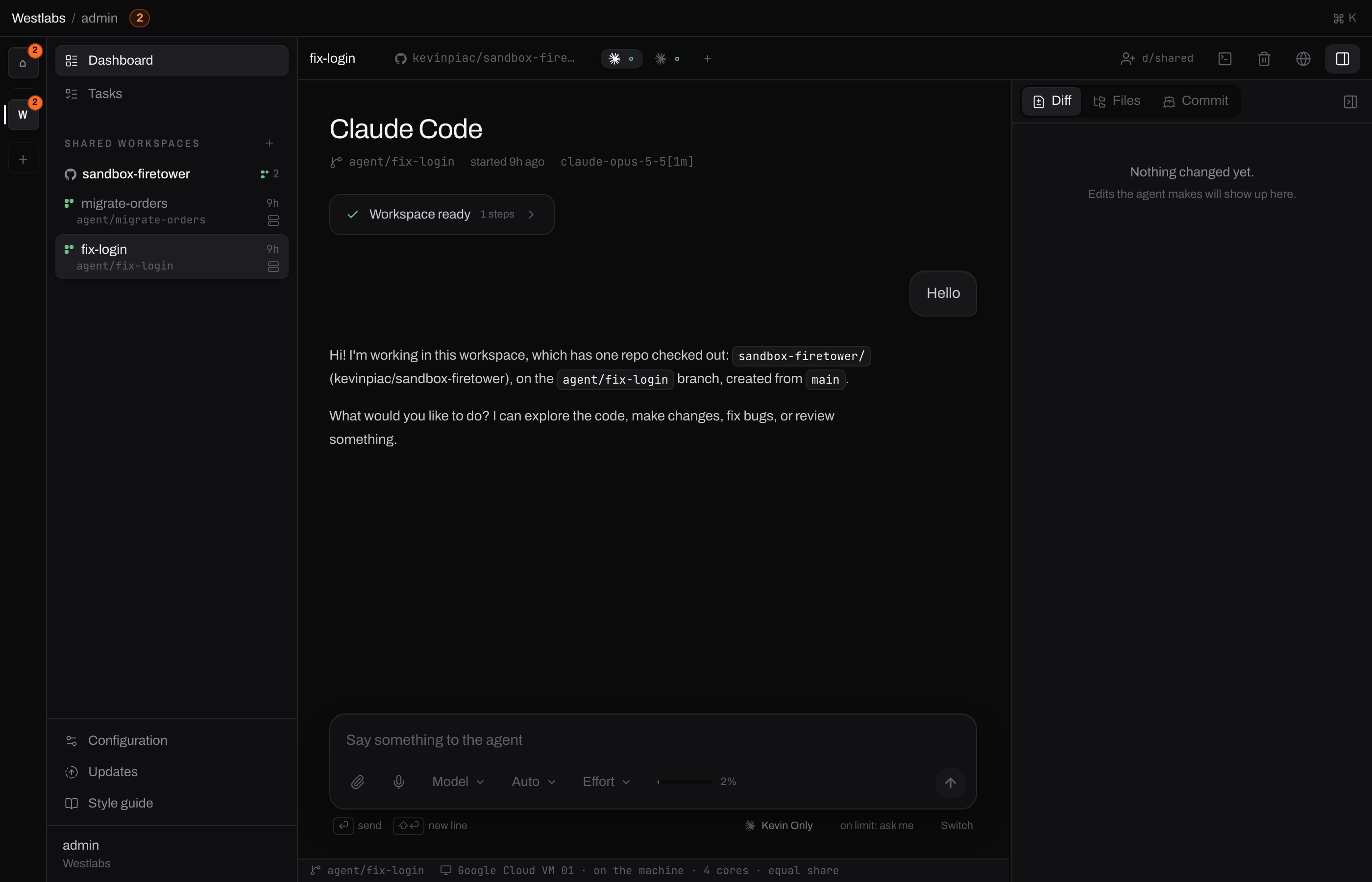
One workspace, fix-login. The two glyphs in the toolbar are the two agents
working in it; clicking one reads its conversation. d/shared at the top
right is where the workspace is filed.
#What is in one
d/shared
The directory the workspace is filed in. Whoever reaches this directory reaches the workspace.
holds
Workspacefix-login
The place. One branch, one folder, on one machine, with a terminal into it. Anybody with Editor here can work in it.
- branch agent/fix-login
- checkout one folder, shared
- machine Google Cloud VM 01
and in it, one session per agent
SessionClaude Code
- started by
- kevin
- spends
- kevin's subscription
- pushes as
- kevin on GitHub
- typed in by
- kevin, and nobody else
SessionCodex
- started by
- bob
- spends
- bob's subscription
- pushes as
- bob on GitHub
- typed in by
- bob, and nobody else
Both agents are editing the same folder. The work is shared; the accounts paying for it are not.
Sharing a workspace is the same as sharing anything else. Move it into a directory, or name somebody on it. See Sharing a resource.
What that gets somebody is the place.
#What each level can do
| Viewer | Editor | Owner of a conversation | |
|---|---|---|---|
| Read the transcript | yes | yes | yes |
| See the diff and the files | yes | yes | yes |
| Open a terminal | no | yes | yes |
| Attach another repository | no | yes | yes |
| Start their own agent here | no | yes | yes |
| Type into this conversation | no | no | yes |
| Answer what this agent is asking | no | no | yes |
| Change this agent's model | no | no | yes |
| Commit and push from this agent | no | no | yes |
| End this agent | no | no | yes |
| End the whole workspace | no | no | whoever owns the workspace |
The right-hand column is not a level you are given. It is simply whether the conversation is yours, and it cannot be granted to anybody else.
#Why a conversation cannot be handed over
An agent is a running program signed in as one person. It spends their Claude or Codex subscription, and when it pushes a branch it uses their GitHub account, so their name is on the commits.
If a colleague with Editor could type into it, they would be spending your quota and committing as you. So they cannot, and neither can an organisation Admin. Being able to administer is not the same as being able to spend.
#What you see in somebody else's conversation
Everything, except the box to type in.
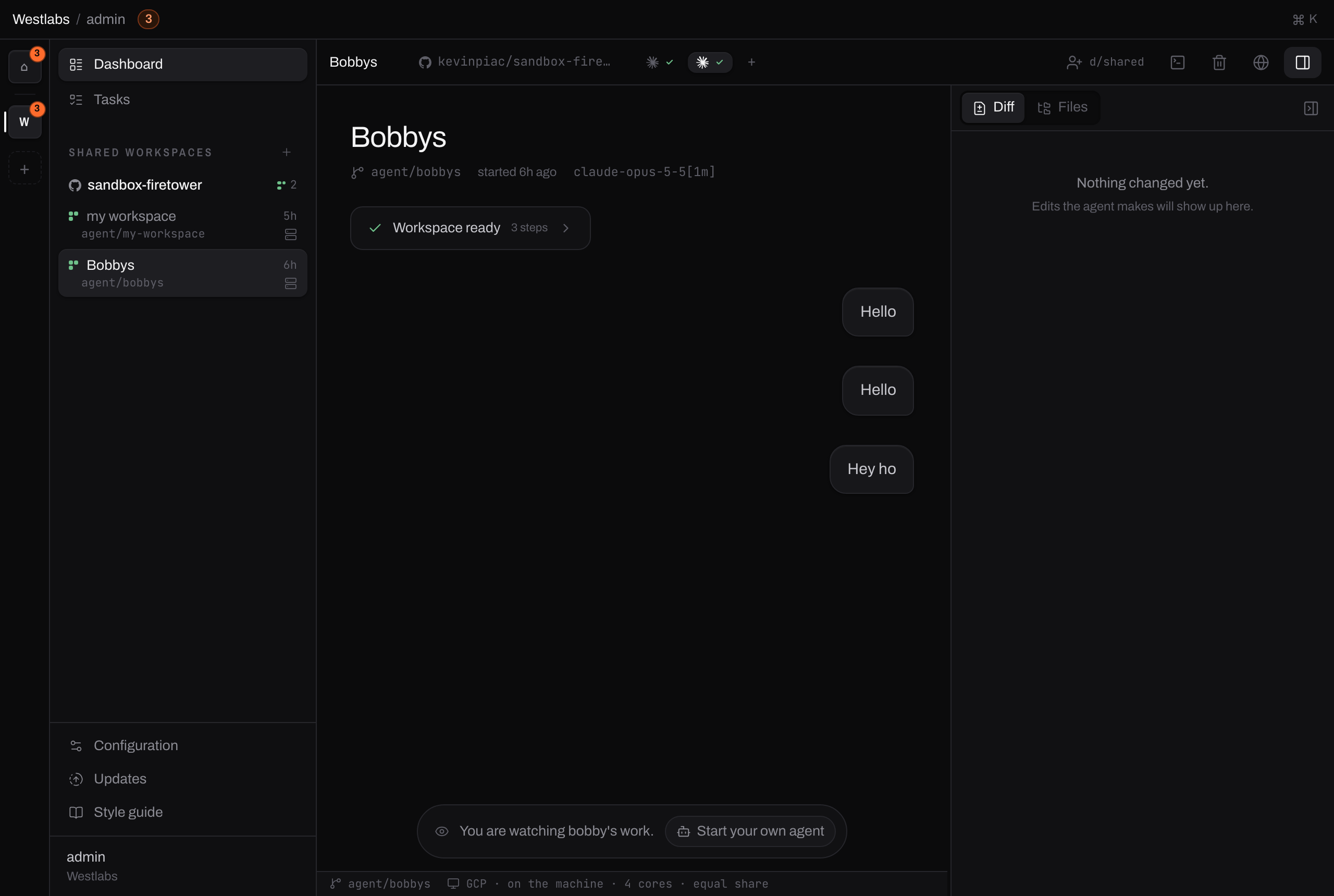
The transcript, the diff and the files are all there. Where the box to type in would be, there is a line saying whose work this is and the one thing you can do about it.
Each chip in the toolbar is one agent, and clicking one reads its conversation whoever started it. Your own are unchanged: open one of those and the composer is where it always was.
#Joining in: start your own agent
Press + in the toolbar, or the button on that line. You get a second agent in the same workspace: the same branch, the same files, the same machine, and your own subscription and GitHub account.
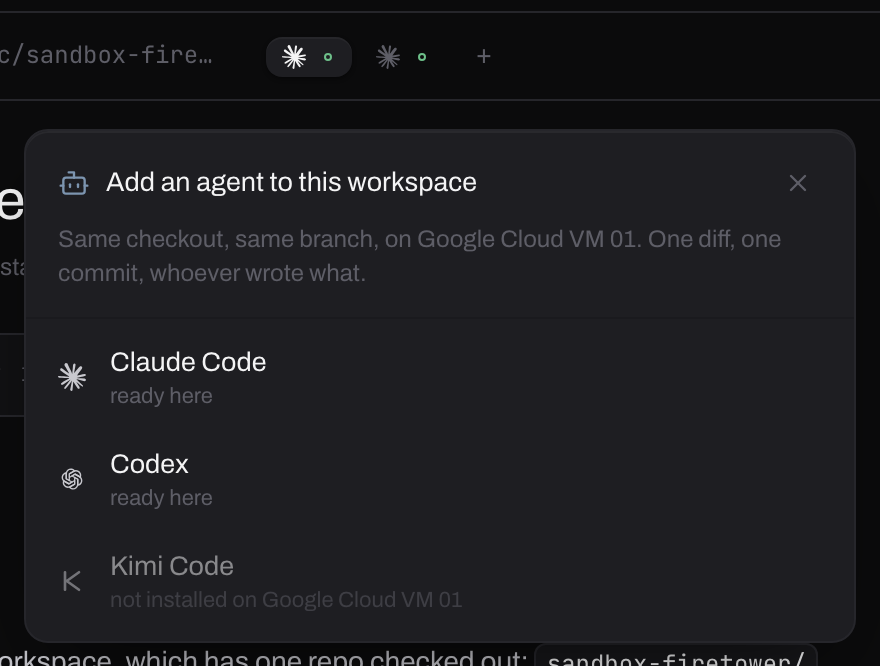
The + sits after the chips, so what it adds is visibly one more of those. The agents offered are the ones installed on this workspace's machine that you have an account for; one you have not connected says so instead.
This is also how you take work over from somebody. Read what their agent did, then start your own and carry on from the same branch.
Note
Both agents are editing the same files at the same time. If you are continuing somebody's work rather than working beside them, it is worth agreeing that they have stopped before you start.
#Ending things
Ending an agent is for whoever started it. Your agents are yours to stop, and theirs are theirs.
Ending the workspace stops every agent in it, including other people's, so it belongs to whoever owns the workspace. If it is in your own space, that is you. If it has been moved into a directory, it is whoever has Admin there.
If the control is not offered to you, that is why.
#What sharing a workspace also shares
The files. Anyone who can see the workspace can see what is in it. That includes any environment variables a repository writes into it, so if those hold production secrets, sharing the workspace shares them.
The machine it runs on, through the terminal. An Editor can open a shell in the workspace folder. That is deliberate, because their agent can run commands there anyway, but it is worth knowing that Editor on a workspace means a shell on the machine hosting it.