Update
From the app, not from a terminal. Updates in the sidebar says what you are running and what is out; Check now asks again; the buttons on the rows do it. Two things get updated here: the deployment itself, and the worker on each machine.
#Where it is
Updates, at the bottom of the sidebar, under Configuration. Anybody can open it. What it offers is what that person could actually do.
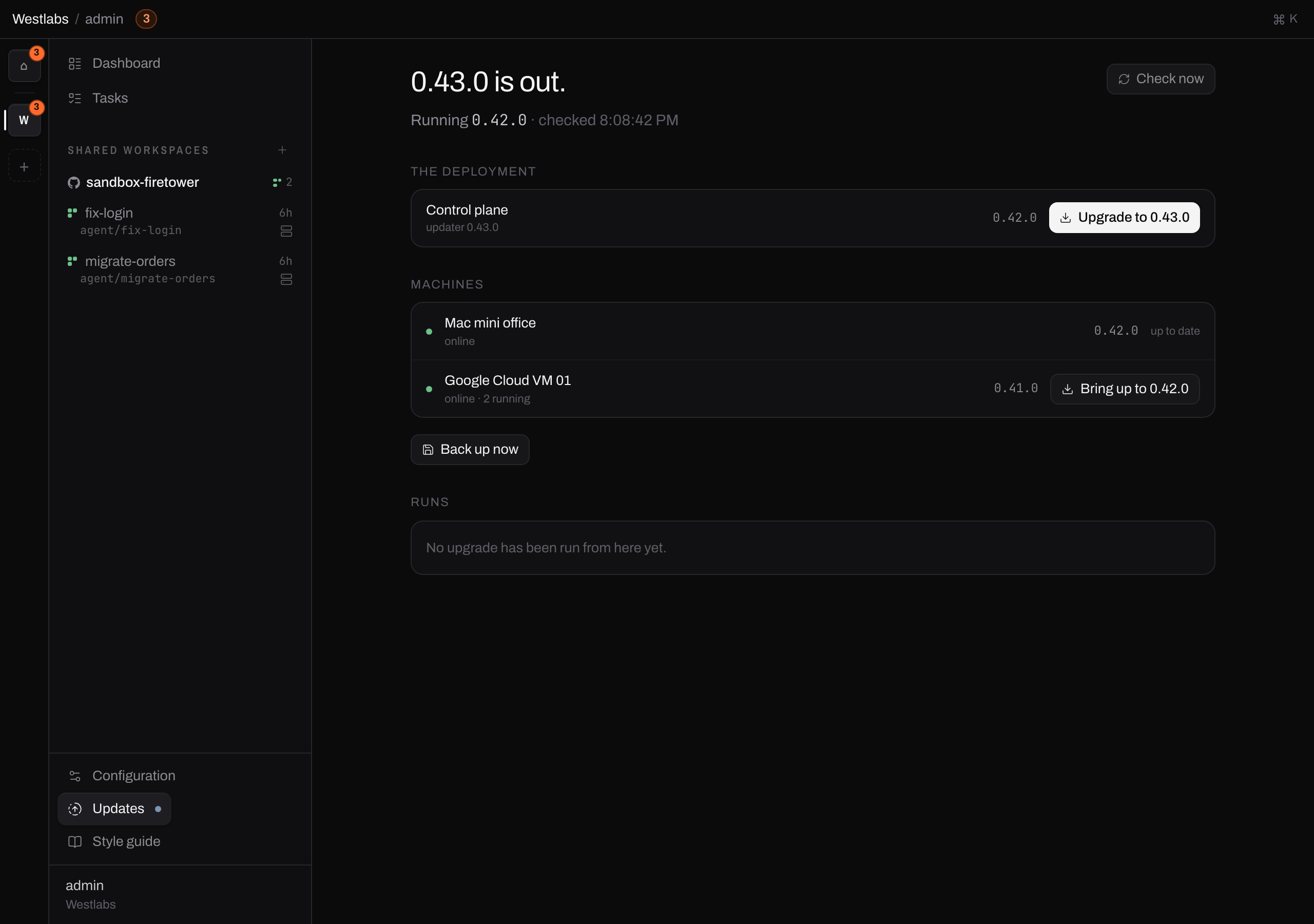
Updates, seen by an administrator. The deployment is one row, every machine is a row under it, and past runs are listed at the bottom.
The heading is the thing you can act on. An administrator with a release out reads "0.43.0 is out". Somebody who only administers one machine reads "Google Cloud VM 01 is behind", because the release is not theirs to install and the machine is.
#Who can update what
| Read the screen | Update the deployment | Update a machine | |
|---|---|---|---|
| Organisation Admin | yes | yes | yes |
| Owns the machine, or administers the directory it is in | yes | no | that machine |
| Everybody else | yes | no | no |
Reading is not updating. Everybody sees the version this Firetower runs and whether a newer one is out, because somebody who cannot tell their work is running on something six months old cannot ask for anything about it. The machines in the list are narrowed to the ones they can already see.
The deployment is the organisation's. Recreating the control plane and its database is the one action here that interrupts every person at once, so it is an Admin's and nobody else's.
A machine belongs to whoever administers it. That is the same question the sharing panel asks everywhere else: you own it, you have Admin on the directory it is filed in, or you administer the organisation. Nothing new is invented here. See Permissions.

The control plane row, to somebody who is not an administrator. The version is there and the button is not.
#Check now
Firetower asks the releases feed on its own, and Check now asks straight away. The line under the heading says when it last looked.
#Update the Firetower
Press Upgrade to 0.43.0 on the control plane row. Nothing happens yet: it opens the sheet that says what the update would do, and you agree to that.
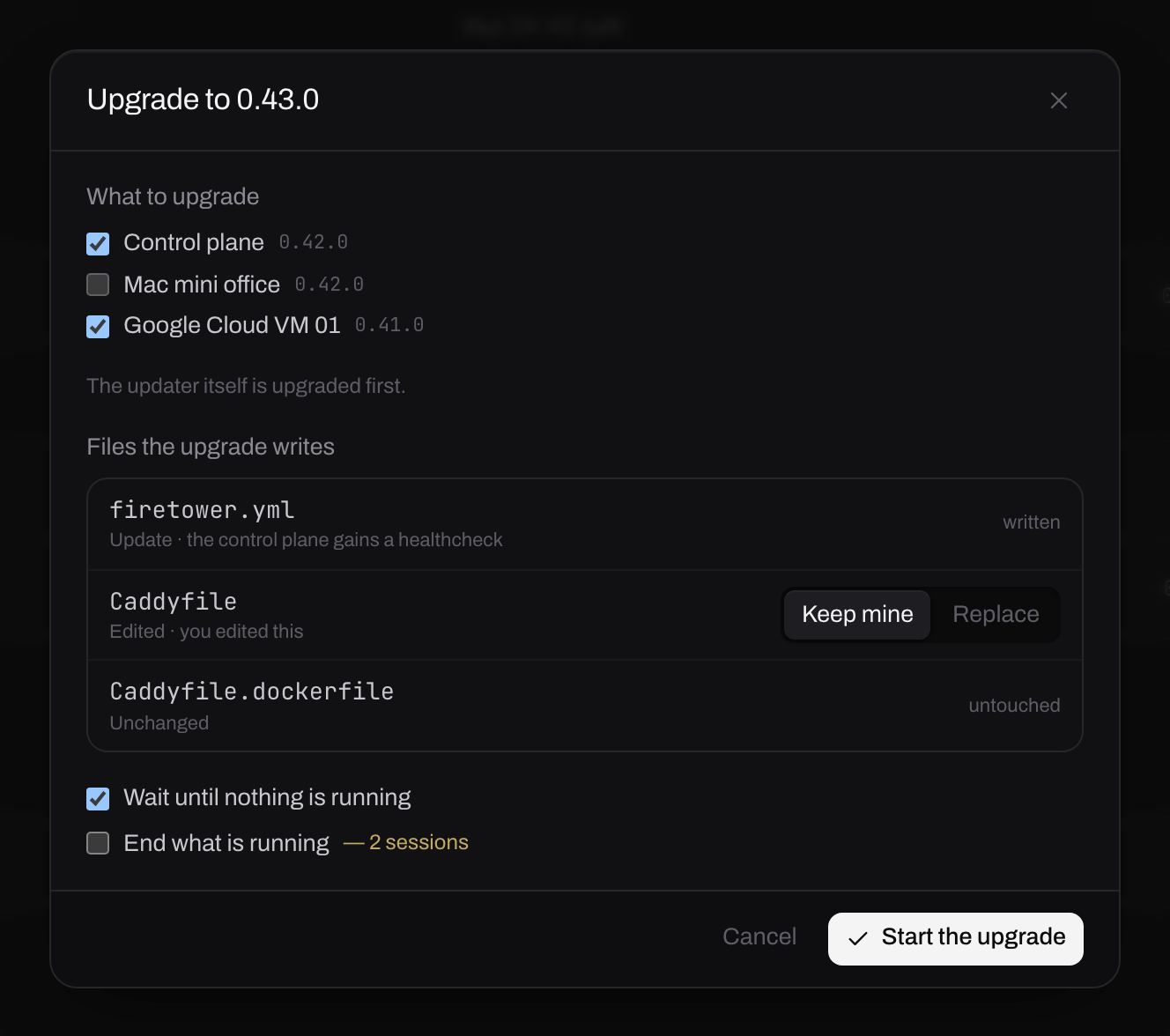
Everything the run would do, before it does any of it.
What to upgrade. The control plane and any machine, in one run. A machine you may not update is listed with the reason and cannot be ticked.
Files the upgrade writes. Some releases change firetower.yml or the
Caddyfile. Each one says what it is: Update is a file the release changed and
you have not, written without asking. Edited is one you changed, and that is
the choice on the right. Keep mine leaves your version alone, which is what
you want if you dropped Caddy for a proxy you already run. Replace takes
the release's. Nothing overwrites an edit of yours unless you say so here.
Wait until nothing is running holds the run until the sessions on the targets have ended by themselves, which is the kind default. End what is running does not wait, and says how many sessions that is.
This loses work
Updating the control plane recreates it, so everybody using this Firetower is disconnected while it restarts, and the agents on any machine in the same run are ended. Tick wait until nothing is running unless you know what is open.
#Watching it
The run appears under Runs and opens to its steps. They are the real ones, in order, with the live log of whichever is going.
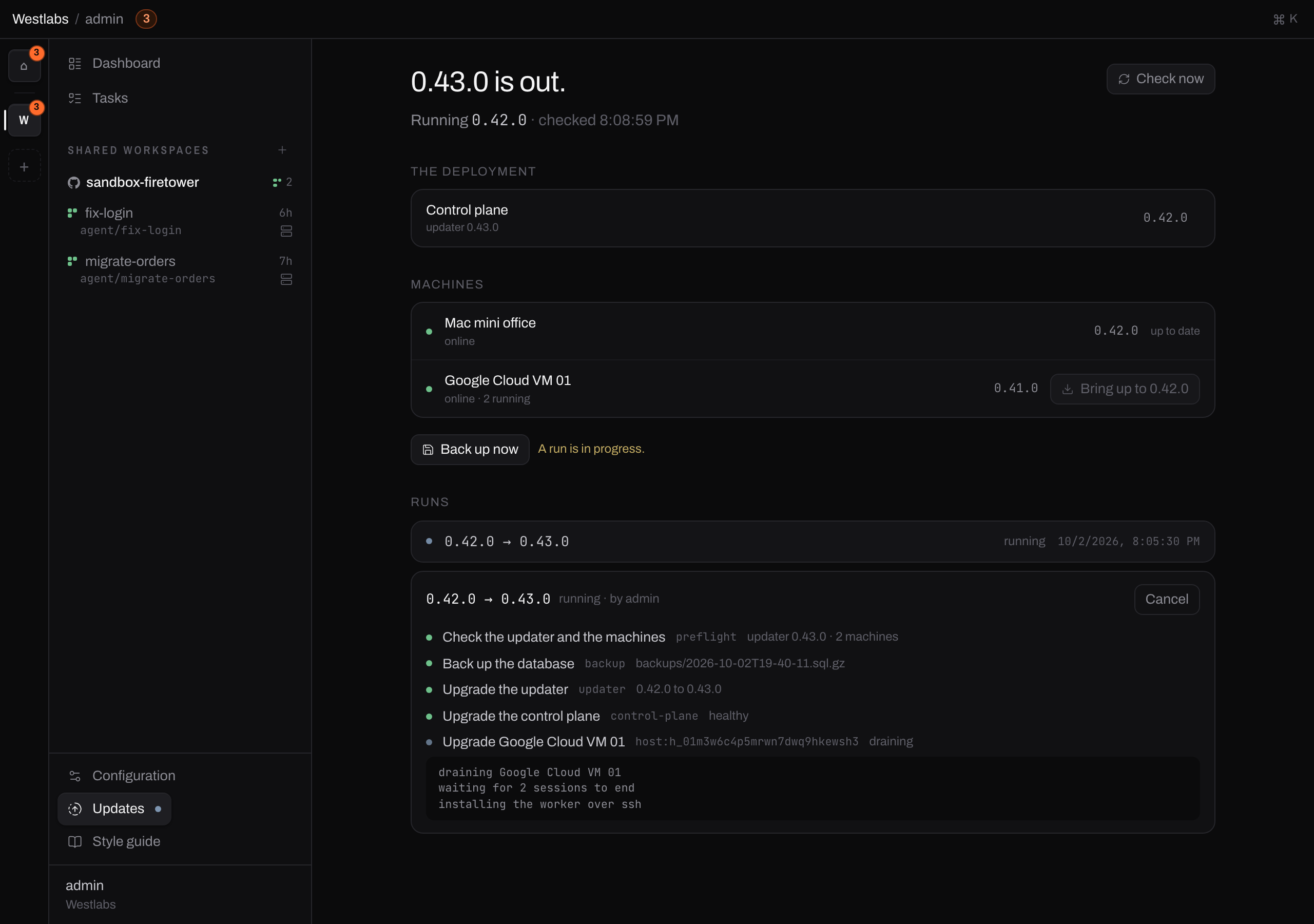
A run in progress. The backup is a step like any other, and it is first.
Cancel stops a run that has not started changing anything, puts the drained machines back in service, and is refused once a step is part way through recreating something. Half a recreate is worse than a whole one.
If the backup fails the run stops and asks rather than carrying on, and Continue anyway is how you tell it to go without one. The step keeps its warning, so the history says the update happened without a backup.
A run is visible to whoever started it, and to an administrator. Somebody who updates a machine can watch what they started.
#Back up now
The same backup, outside an update, for administrators. Worth pressing once when you set the thing up: until it existed the only way to find out a backup was broken was to try to update.
It writes into backups/ in the deployment directory, with the root key beside
the dump. A database backup without that key cannot be decrypted, which is also
why the two should not be stored in the same place afterwards.
#Update a machine
Every machine that runs agents has a worker on it, and the worker is updated separately from the deployment. Firetower does it over the same SSH connection it uses for everything else: drained first, one machine at a time.
#Level with the Firetower, never past it
A machine is brought up to the version the control plane is running, and no further. That is what the button offers and the only version the server will accept.
So a newer release is never installed on a machine on its own. Moving the deployment is what raises the ceiling, and then the machines follow.
Note
This is not caution for its own sake. Whoever administers one machine may have no right to update the control plane, so a worker stranded ahead of it is one they cannot rescue.
#From the Updates screen
Press Bring up to 0.42.0 on the machine's row. If anything is running on it you are asked first, with the titles.
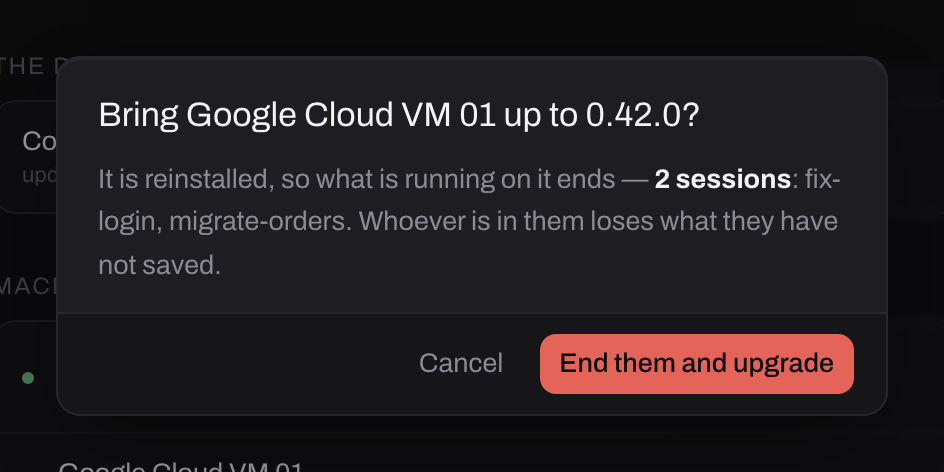
Reinstalling the worker ends what is on the machine. The sessions are named because somebody who administers a shared directory can end work that is not theirs, and the least they can do is read whose it is.
The run drains the machine so nothing new starts on it, waits for the sessions to end or ends them, installs the worker, waits for it to answer as the new version, and puts the machine back in service. A machine that is unreachable is skipped and named.
To somebody who does not administer it, the row is there and the button is not.

Knowing a machine you work on is behind is worth something. Moving it is somebody else's.
Machines nobody has shared with you are not in the list at all.
#From the machine's panel
Configuration → Compute → Machines → the machine → Reinstall the worker does one machine, whenever you like, with no version check in the way.
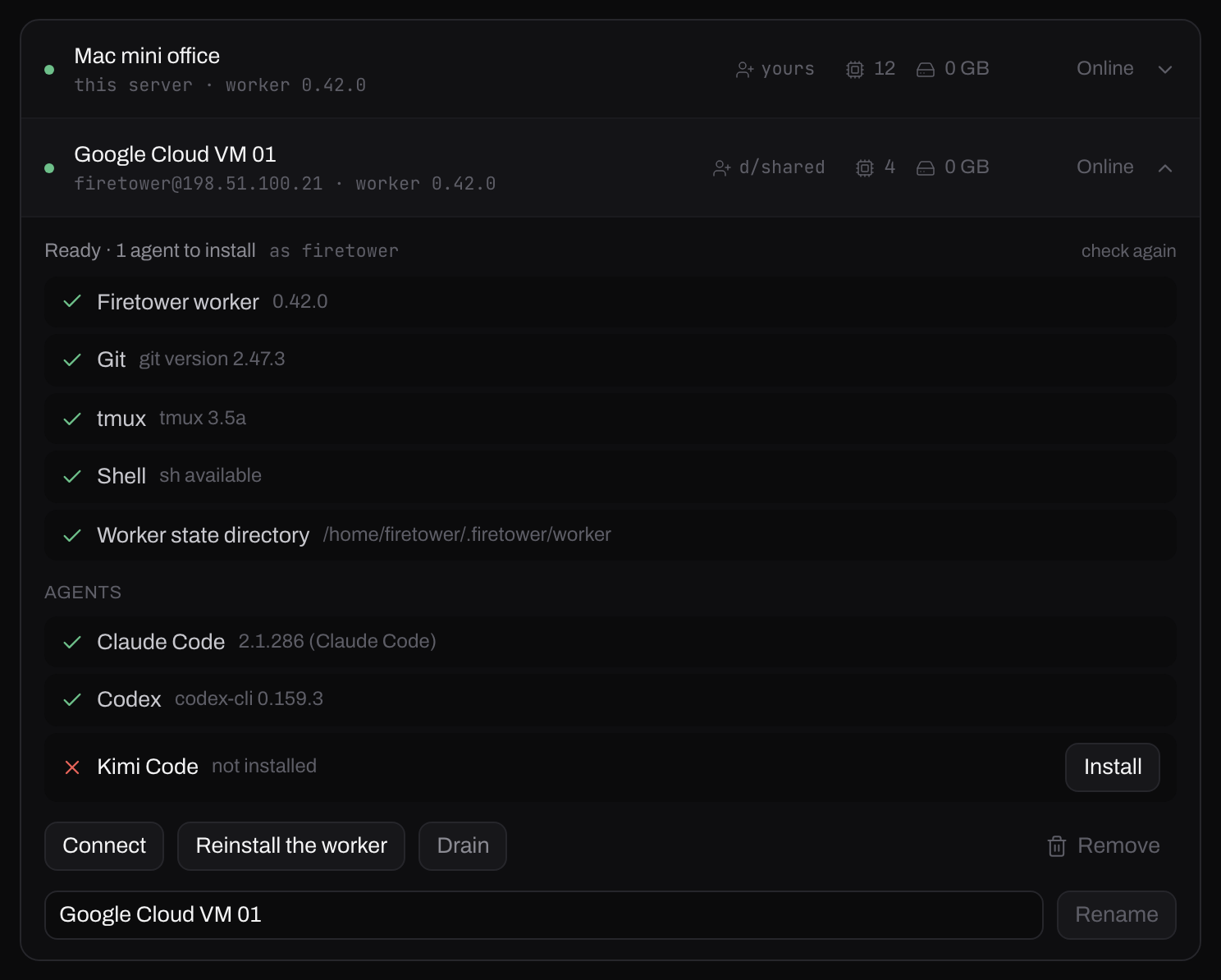
The same panel that added the machine. Its address here is one of the ranges reserved for documentation.
Drain first if sessions are running. Replacing the binary does not stop an agent that is already going, but it is the only way to be sure nothing starts in the middle of it.
The checks above the buttons are the useful part of this panel: the worker's version, git, tmux, a shell, the state directory, and which agents are installed. If a feature seems not to exist on one machine, this is where to look.
#Version drift
Firetower compares its own version against each worker's on every connection.
A worker that is behind still works, quietly. It runs sessions perfectly well; what it cannot do is anything added since it was built. One older than the protocol the control plane speaks is refused at the handshake and shows as behind until it is reinstalled.
The version on the Updates screen is the thing to look at when a feature seems not to exist.